Suppose you have a MySQL database that looks vaguely like this picture:
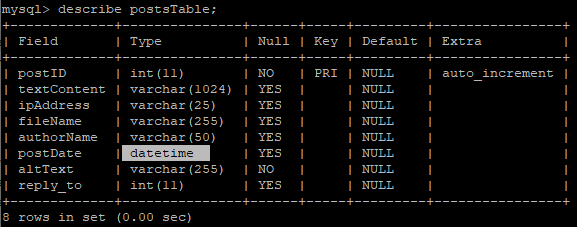
You have a datetime field to store dates and times. In Java, you would assume that the class java.sql.Date would cover this entirely. If you use the SimpleTimeFormat class, you can even override the default string output of java.sql.Date. However, if you were to use the following code to send this java.sql.Date object to the database….
//PreparedStatements...
// ... some other bind value prepared statements ...
statement.setDate(6, date);
You would quickly notice that only the date portion is being saved to the database. Outputting this datetime result from the database may end up looking like “2021-02-23 00:00:00.0”
What gives?
Turns out, in Java, you should actually be converting your java.sql.Date to a java.sql.Timestamp if you don’t want the time portion to get cut off when you send it to the database using a PreparedStatement. It may seem strange but the line statement.setDate(6, date) totally cuts out the time portion even though you can extract both the time AND date from the java.sql.Date object.
I suspect this is largely to do with the fact that java.sql.Date has that default string presentation that I hinted at before and that you have to override it. Timestamp seems to override it in the same way but the difference is you can use PreparedStatements in conjunction with Timestamp objects.
Timestamp insert_date = new Timestamp((date.getTime()));
//...
statement.setTimestamp(6,  insert_date );
You may have felt inclined to store your date & times fields as strings in your database but you should not do that.
Conclusion
Working with dates and times in Java is a bit of a mess.
 Seth's blog